Manage Subscriptions block on Thank You page
Overview
- You can let customers manage their subscriptions immediately after checkout by adding Utterbond’s “Manage Subscriptions” block to your Shopify Thank You (Order Status) page.
- Once enabled, the Thank You page will display a “Go to Subscription Portal” button, directing shoppers directly to their Utterbond customer portal. From there, subscribers can pause, skip, swap products, or update their subscription details without contacting support.
- This feature significantly reduces churn and support tickets by giving subscribers instant, self-service access to manage their active subscriptions right after purchase.
🔧 Pre-requisites & Setup Conditions
Before you attempt to add the block:
- our store must be using a theme compatible with Shopify’s Online Store 2.0 (or at least compatible with the mechanism that lets apps inject content into the Checkout/Thank You page).
- The Utterbond Subscriptions app should be installed and fully configured on your store.
🛠️ How to Add the “Manage Subscriptions / Customer Portal” Block on Thank You page?
Depending on your theme type:
- Go to Shopify Admin → Online Store → Themes.
- Click Customize on the active theme.
- From the top menu in the theme editor, select Checkout and Customer Accounts / Thank You Page.
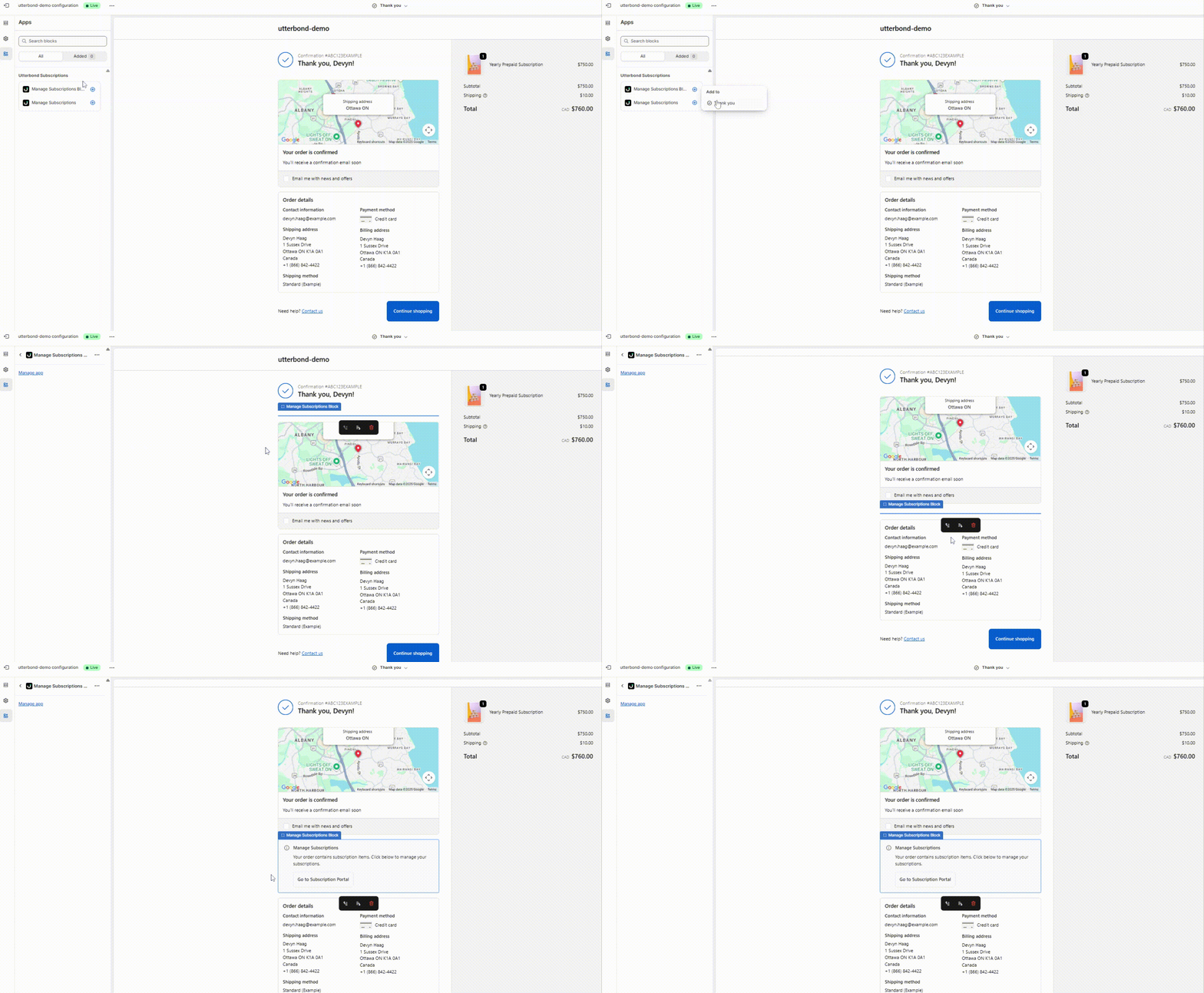
- In the left sidebar, expand Apps (or ‘App blocks’). Locate “Manage Subscriptions Block”.
- Click the + (plus) icon or “Add block” to add the block.
- Adjust the block’s placement/order so that it’s visible and obvious to customers (e.g. near the top of the Thank You page). Then click Save.
⚙️ What the Customer Sees / What Happens
- On the Thank You page, the customer will see a “Go to Subscription Portal” (or “Manage Subscriptions”) button.
- Clicking that button redirects them to their self-service portal powered by Utterbond, where they can:
- Pause, skip, or cancel upcoming shipments/orders.
- Swap products or change variants (if your plan allows product swapping).
- Update payment method or shipping address.
- Adjust subscription frequency, reorder quantity, skip a billing cycle, or apply discounts (depending on your subscription plan settings).
- View upcoming orders, billing dates.